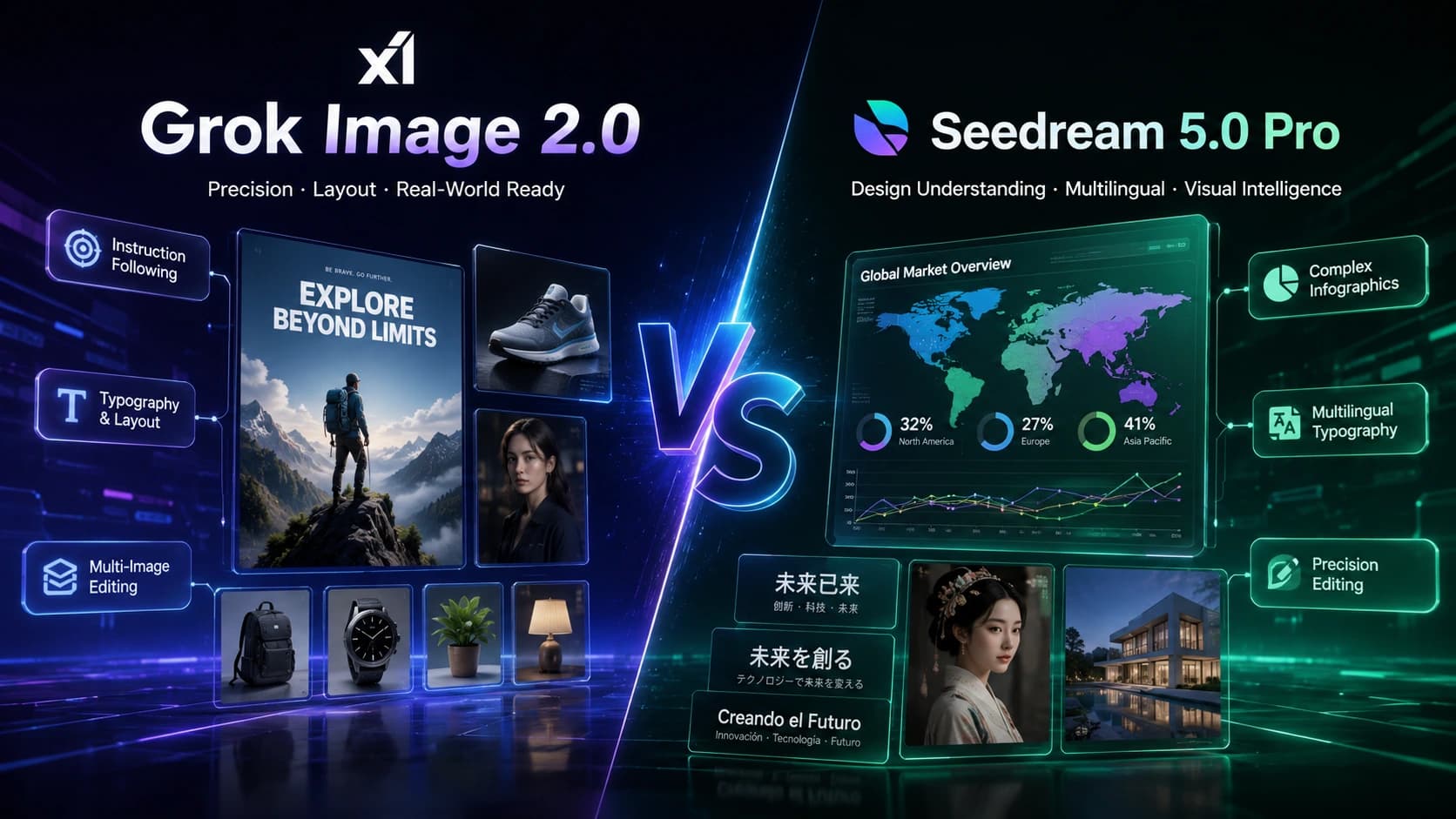
In 2026's AI image generation landscape, two names keep coming up: xAI's Grok Image 2.0 (officially released as Imagine Image 2.0, API model name grok-imagine-image-2.0) and ByteDance's Seedream 5.0 Pro. One is built around precise instruction following and reliable image editing; the other around deep prompt understanding and multilingual typography. This post compares both across core capabilities, specs, real pricing, and use cases — with concrete examples — to help you decide which fits your workflow.
The short answer
Grok Image 2.0 is built to turn a creative brief into a usable asset: tight instruction following, deliberate (not decorative) typography, and stable preservation of confirmed details across edits — a strong fit for product shots, posters, and copy-heavy visuals that need to hit several requirements at once. Seedream 5.0 Pro leans toward deep prompt comprehension and structured output: higher resolution ceiling, more reference images, and native multilingual text rendering, which gives it an edge in information-dense design and multi-reference consistency work. xAI's model is built for precise editing, crisp text rendering, improved factuality, and production-ready visual work, while ByteDance's flagship image model is defined by deep-thinking prompt understanding and native multilingual text.
Neither model is a strict upgrade over the other — they're optimized for different jobs, and the right pick depends on whether your priority is budget and precision, or resolution and structured layout control.
What each model is
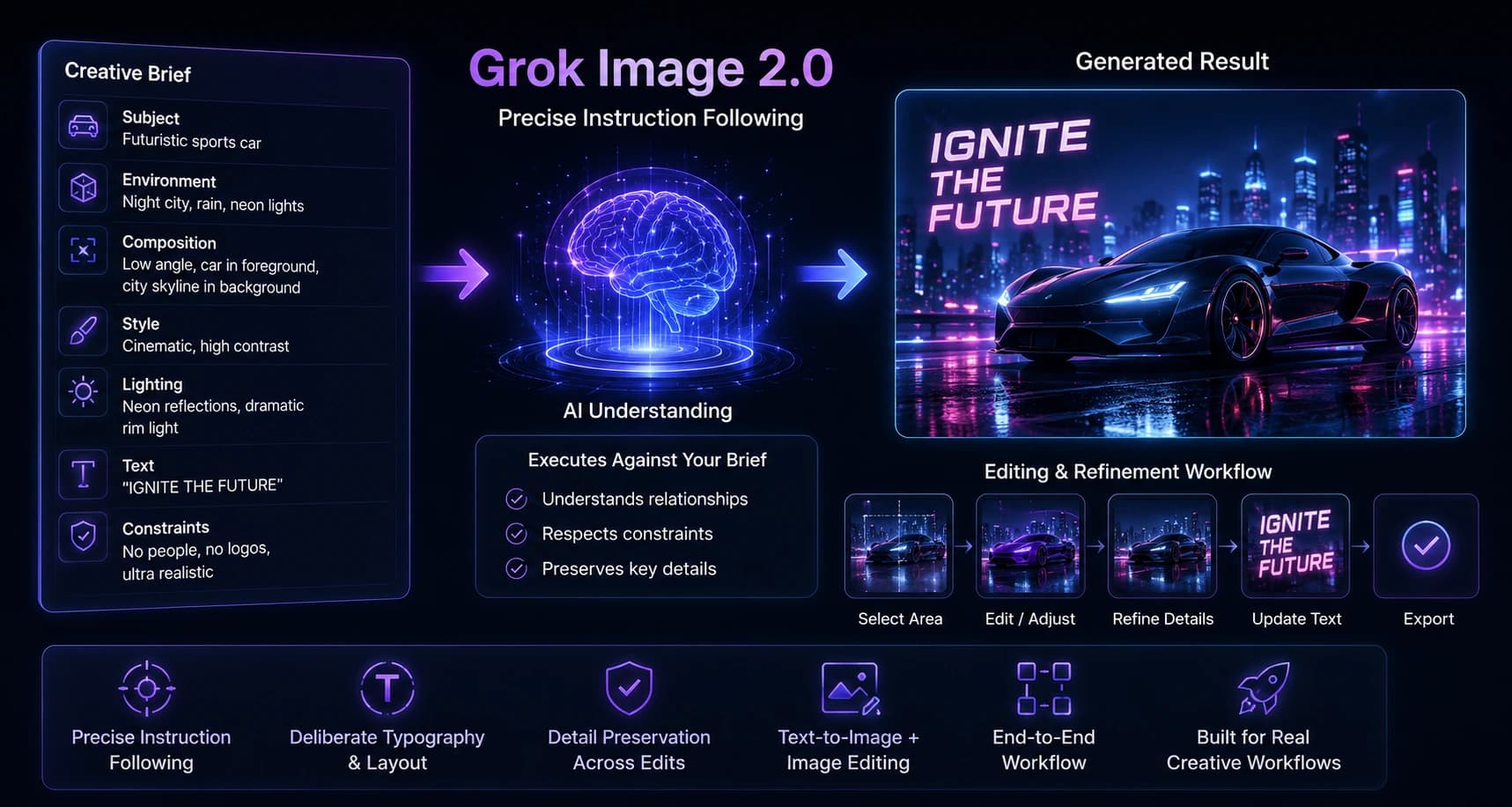
Grok Image 2.0
is the latest generation in the Grok Imagine image family, released in August 2026, and focused on three things: precise instruction following for briefs with several connected requirements, deliberate typography and layout hierarchy, and preservation of successful details across editing passes. A third-party workspace like GrokImage20.com packages this into a single text-to-image + image-editing workflow — describe the subject, environment, composition, style, lighting, text, and constraints, and the model executes against that brief rather than optimizing for "looks good" alone. In practice this means Grok Image 2.0 tends to reward a specific, structured prompt (subject + environment + composition + style + lighting + text + constraints) more than a loose, adjective-heavy one.
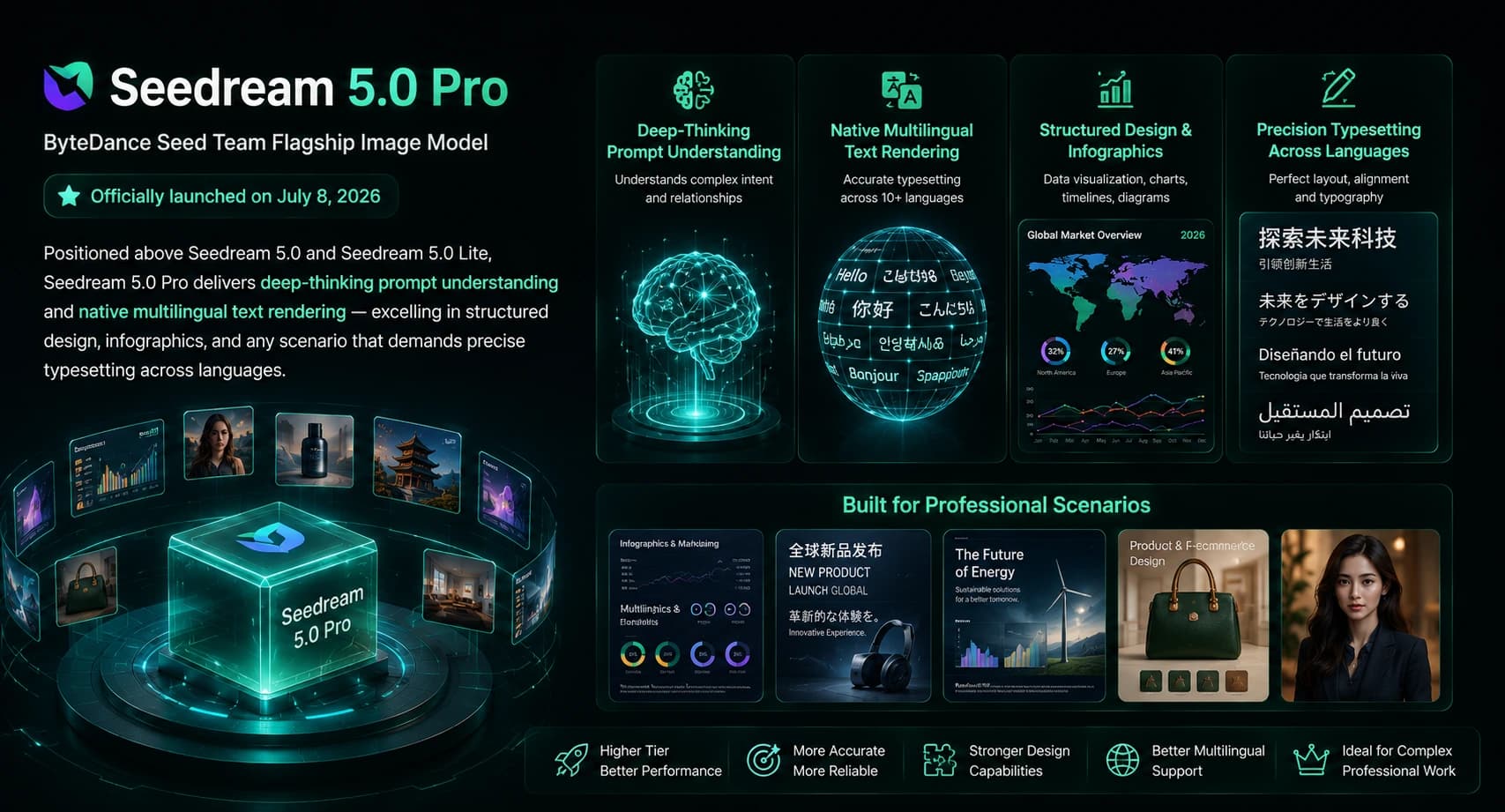
Seedream 5.0 Pro
is ByteDance's Seed team flagship image model, officially launched on July 8, 2026 as the top tier above the standard Seedream 5.0 and the cost-optimized Seedream 5.0 Lite. It is built around deep-thinking prompt understanding and native multilingual text rendering, and it stands out in structured design, infographics, and any scenario that needs precise typesetting across languages. Because Pro sits above two other tiers in ByteDance's lineup, it's worth double-checking which tier a given platform actually exposes — the numbers in this article are specific to the Pro tier, not the Lite or standard versions.
Specs and feature comparison
| Dimension | Grok Image 2.0 | Seedream 5.0 Pro |
|---|---|---|
| Release date | Aug 2026 | Jul 8, 2026 |
| Max resolution | 1K | 1K and 2K |
| Supported aspect ratios | 16:9, 3:2, 4:3, 1:1, 3:4, 2:3, 9:16 | 1:1, 2:3, 3:2, 3:4, 4:3, 16:9, 9:16, 21:9 |
Both models are rated at the same medium generation speed, so speed alone won't be the deciding factor for most people — the real differences show up in resolution ceiling, reference-image capacity, and language support.
One caveat worth flagging: third-party comparison pages don't fully agree on whether Grok Image 2.0 supports image-to-image editing — some list it as unsupported, while more recent listings and xAI's own description confirm reference-guided, natural-language editing is part of the model, just capped at a single reference image versus Seedream 5.0 Pro's ten. If you're choosing between providers, it's worth checking the exact endpoint you're integrating with rather than assuming full feature parity.
Side-by-Side Examples
Spec tables only tell part of the story — the real test is running the same prompt through both models and comparing outputs directly. Sousaku AI runs exactly this kind of comparison, sending identical prompts to Seedream 5.0 Pro and Grok Image 2.0 and displaying the results side by side, without ranking either model. You can see the actual generated images on Sousaku AI's comparison page.
If you want to run your own side-by-side test, the prompt categories that tend to be the most revealing are the ones that stress-test different strengths. Here are five ready-to-use prompts — copy each one as-is into both Grok Image 2.0 and Seedream 5.0 Pro and compare the results.
Dense mechanical / industrial scene — tests material detail, lighting complexity, and how much of a multi-element brief survives generation.
A Victorian-era female inventor working inside a towering steampunk clock tower filled with brass gears, copper pipes, and rising steam. She wears a leather apron and goggles pushed up on her forehead, adjusting a glowing mechanical device on a workbench. Warm golden lamplight mixes with cool blue steam-lit shadows. Three-quarter view, character positioned left-of-center, giant clock dial visible in the background. Cinematic lighting, ultra-detailed textures, photorealistic, 8K quality, dramatic depth of field.

Grok Image 2.0

Seedream 5.0 Pro
Winner: Grok Image 2.0 — closer match to the prompt's specific "warm gold mixed with cool blue" lighting balance.
Painterly / impressionist style — tests color handling and brushwork texture rather than photorealism.
A sunlit garden in Provence, southern France, painted in the style of an impressionist oil painting. Rows of lavender, blooming roses, and sunflowers under warm afternoon light, with an old stone farmhouse in the background. Thick, visible brushstrokes and a rich, textured impasto surface. Wide landscape composition, low horizon line, garden filling two-thirds of the frame. Warm, joyful color palette, painterly texture, gallery-quality fine art finish.

Grok Image 2.0
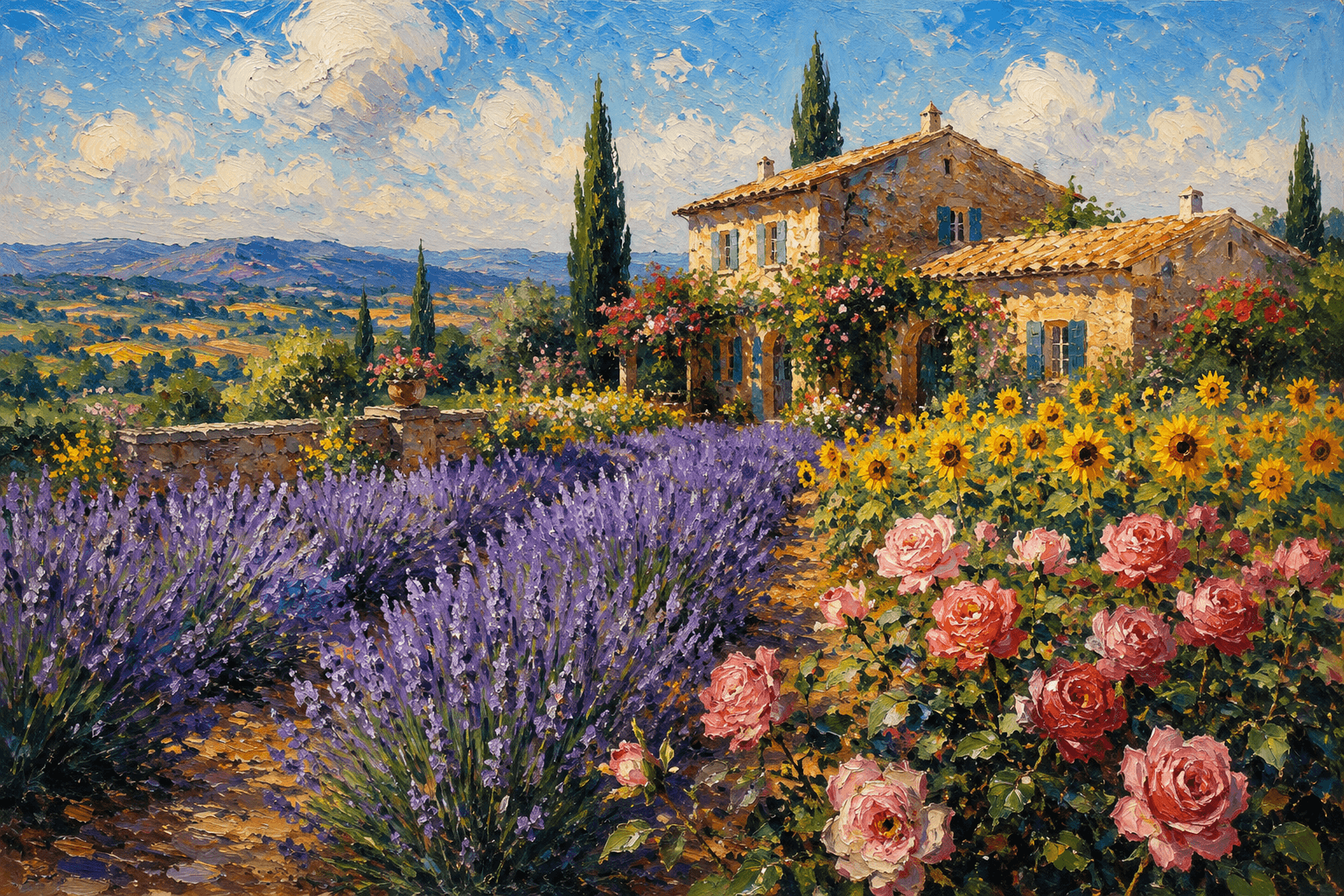
Seedream 5.0 Pro
Winner: Seedream 5.0 Pro — better matches the prompt's request for a "vivid and rich" color palette.
Neon-lit cyberpunk portrait — tests atmosphere, reflections, and mood lighting.
A young woman in a translucent raincoat standing alone under a street lamp on a rain-soaked Tokyo street at night, looking down at a glowing smartphone. Neon signs in pink, blue, and purple reflect off the wet asphalt. Background: overlapping skyscrapers, floating holographic billboards, a flying car passing overhead. Medium shot, subject slightly off-center, strong volumetric lighting and lens flare. Cinematic, moody, ultra-detailed, photorealistic night photography style.
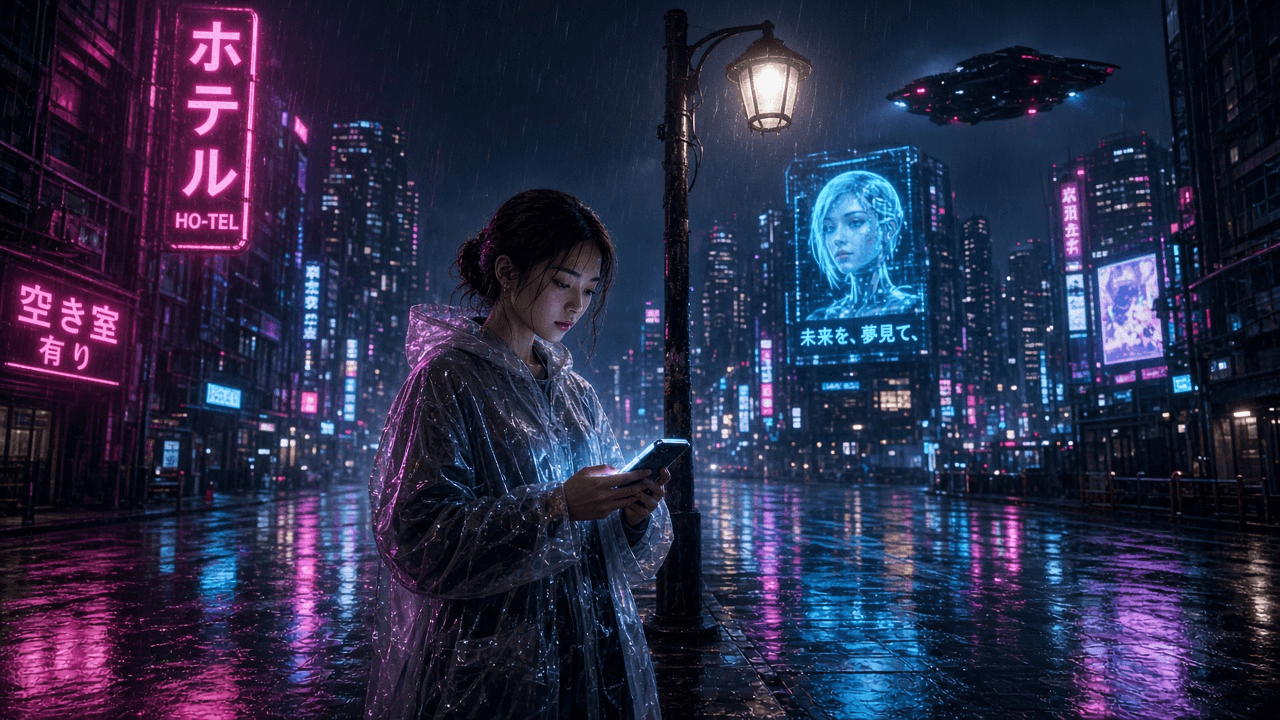
Grok Image 2.0
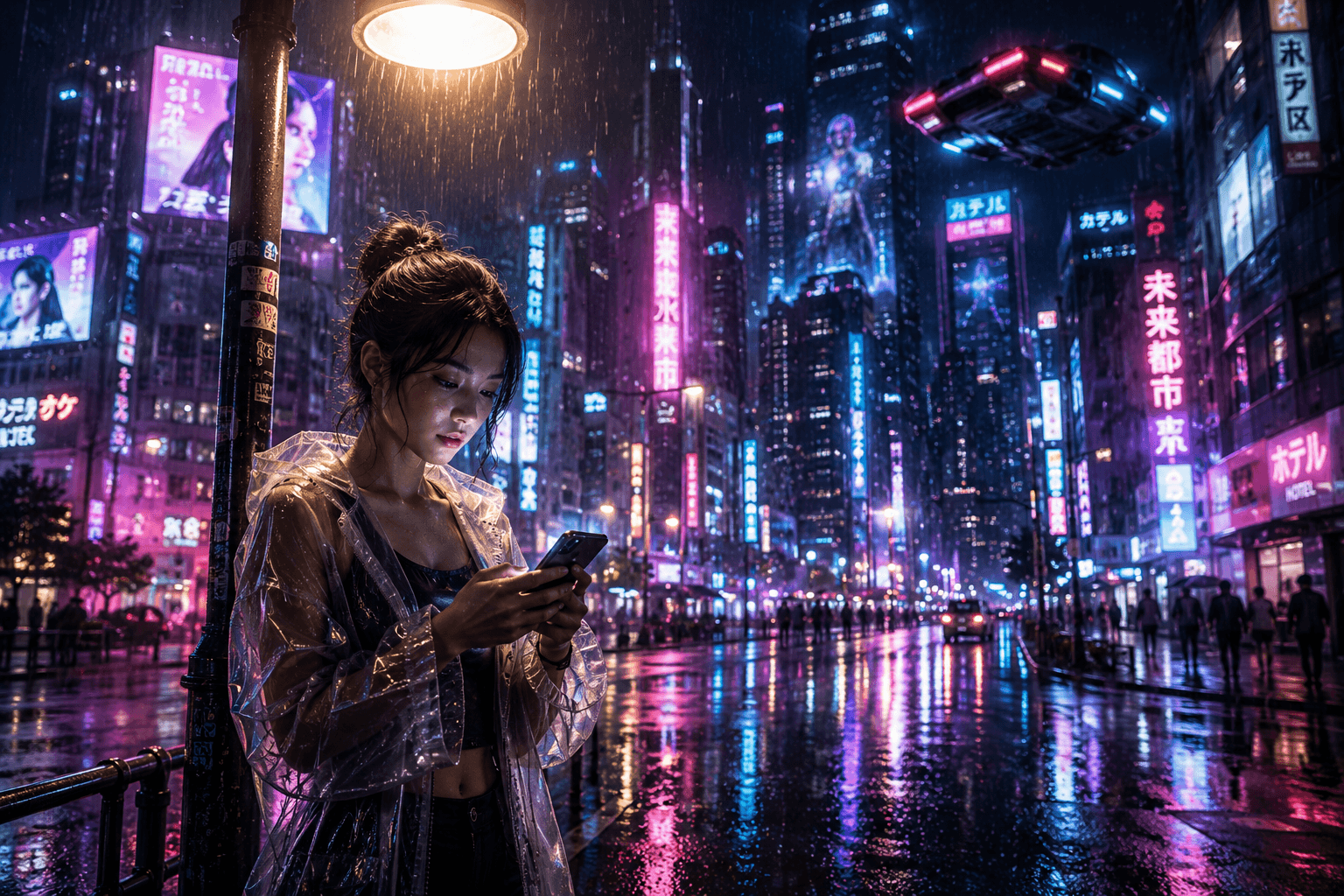
Seedream 5.0 Pro
Winner: Seedream 5.0 Pro — the prompt called for "floating holographic billboards" (plural), and its denser signage matches that more fully.
Illustrated / surreal concept — tests how each model handles a fully imagined, non-photographic scene.
A surreal illustration of a pastel-pink subway car interior completely overtaken by nature: the floor covered in lush green grass dotted with white and yellow wildflowers, the seats and ceiling wrapped in blooming pink and lilac flowers, sunlight streaming through the subway windows. Symmetrical interior view looking down the length of the car. Whimsical, dreamlike illustration style, soft pastel color palette, flat lighting, storybook art quality.
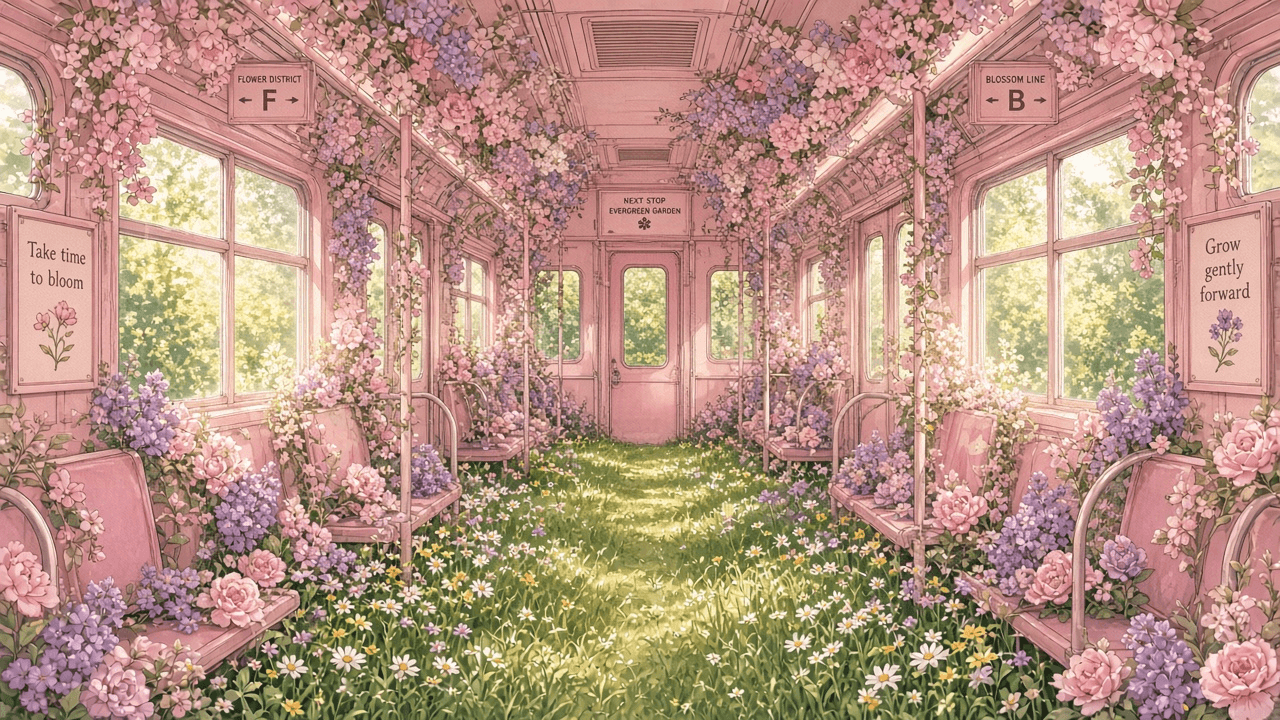
Grok Image 2.0
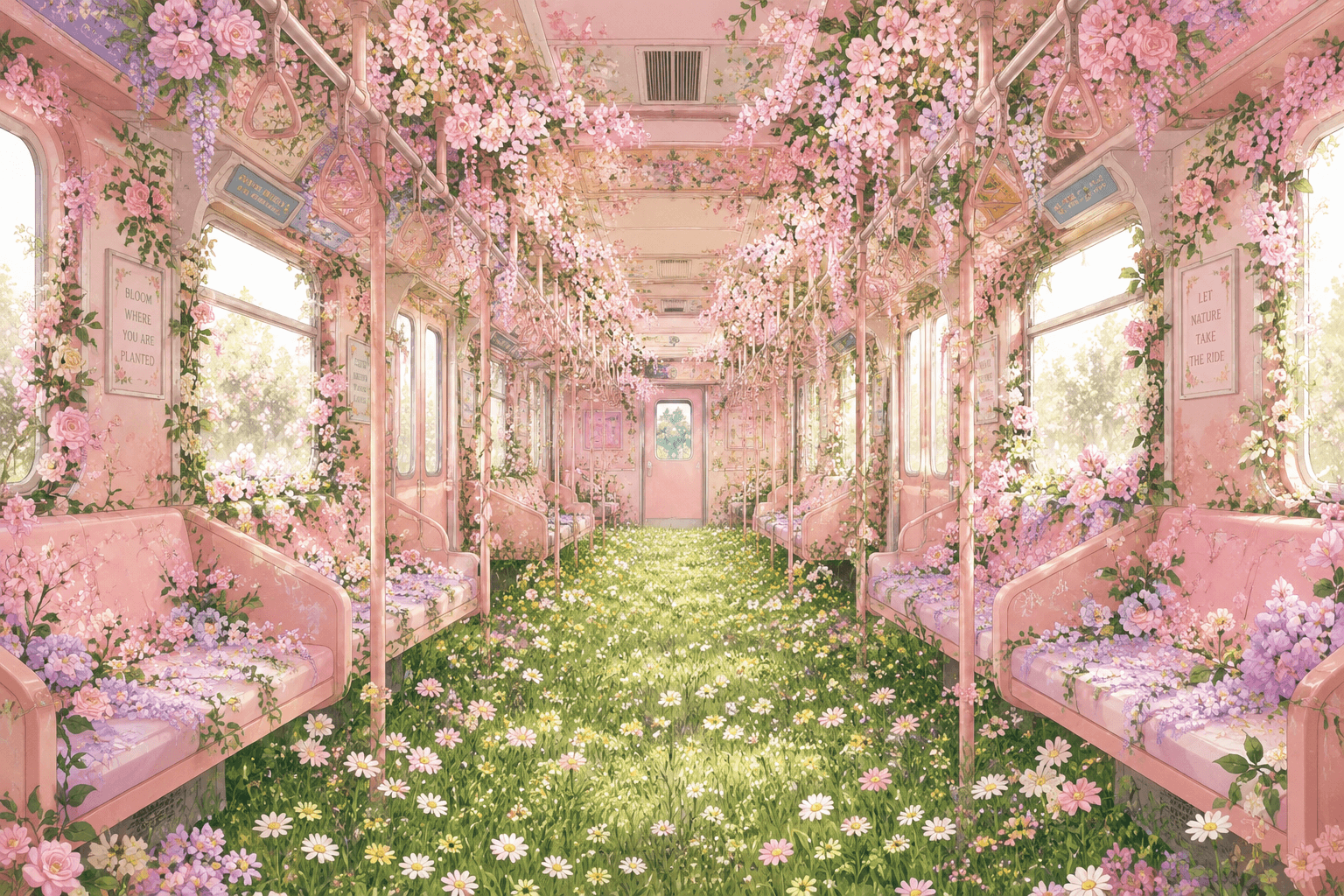
Seedream 5.0 Pro
Winner: Grok Image 2.0 — sharper, more legible on-image typography.
Structured typography / infographic — where Seedream 5.0 Pro's multilingual, layout-aware training tends to matter most, and where Grok Image 2.0's instruction-following gets tested on precision.
A dark-background infographic poster titled "THE DEEP SEA" in bold white sans-serif type at the top, showing a cutaway side-view diagram of a deep-sea exploration submersible with five labeled sections pointing to different compartments: pilot cabin, ballast tanks, robotic arm, sonar array, battery pack. Vertical poster layout, submersible centered, labels connected with thin white lines, clean grid alignment. Scientific illustration style, minimal navy blue and white color palette, sharp readable typography, high information density with clean visual hierarchy.
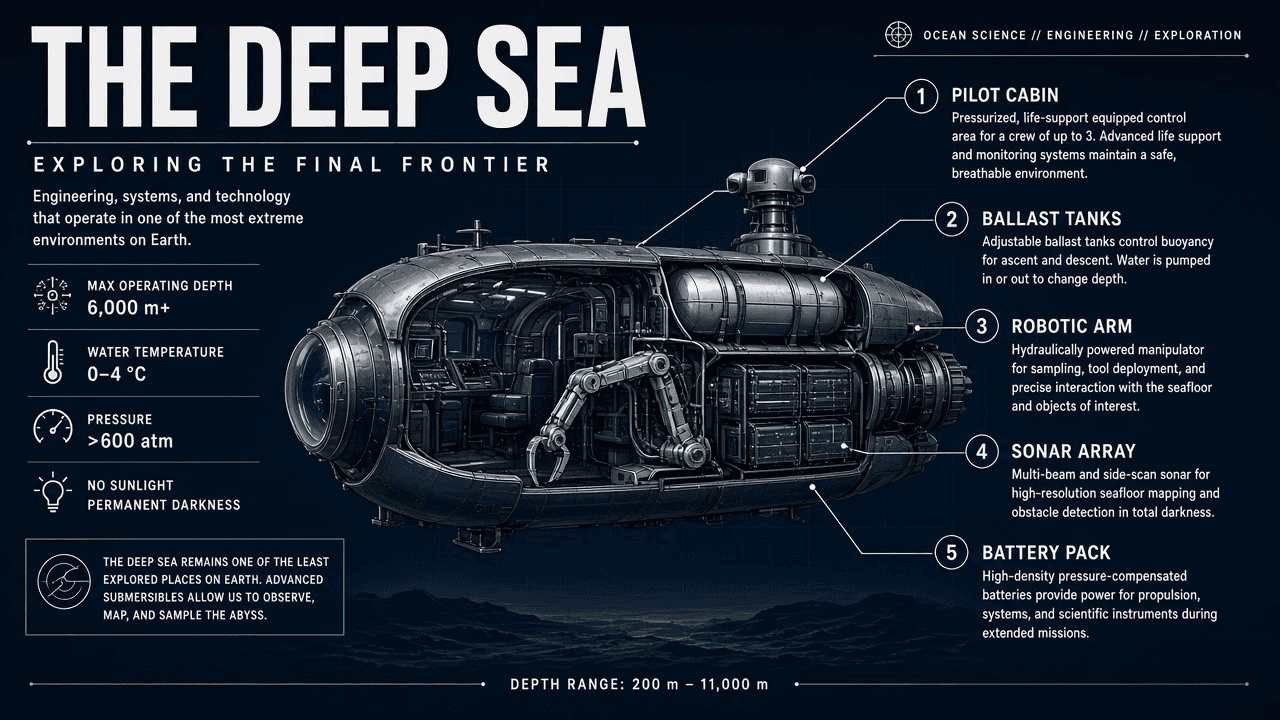
Grok Image 2.0
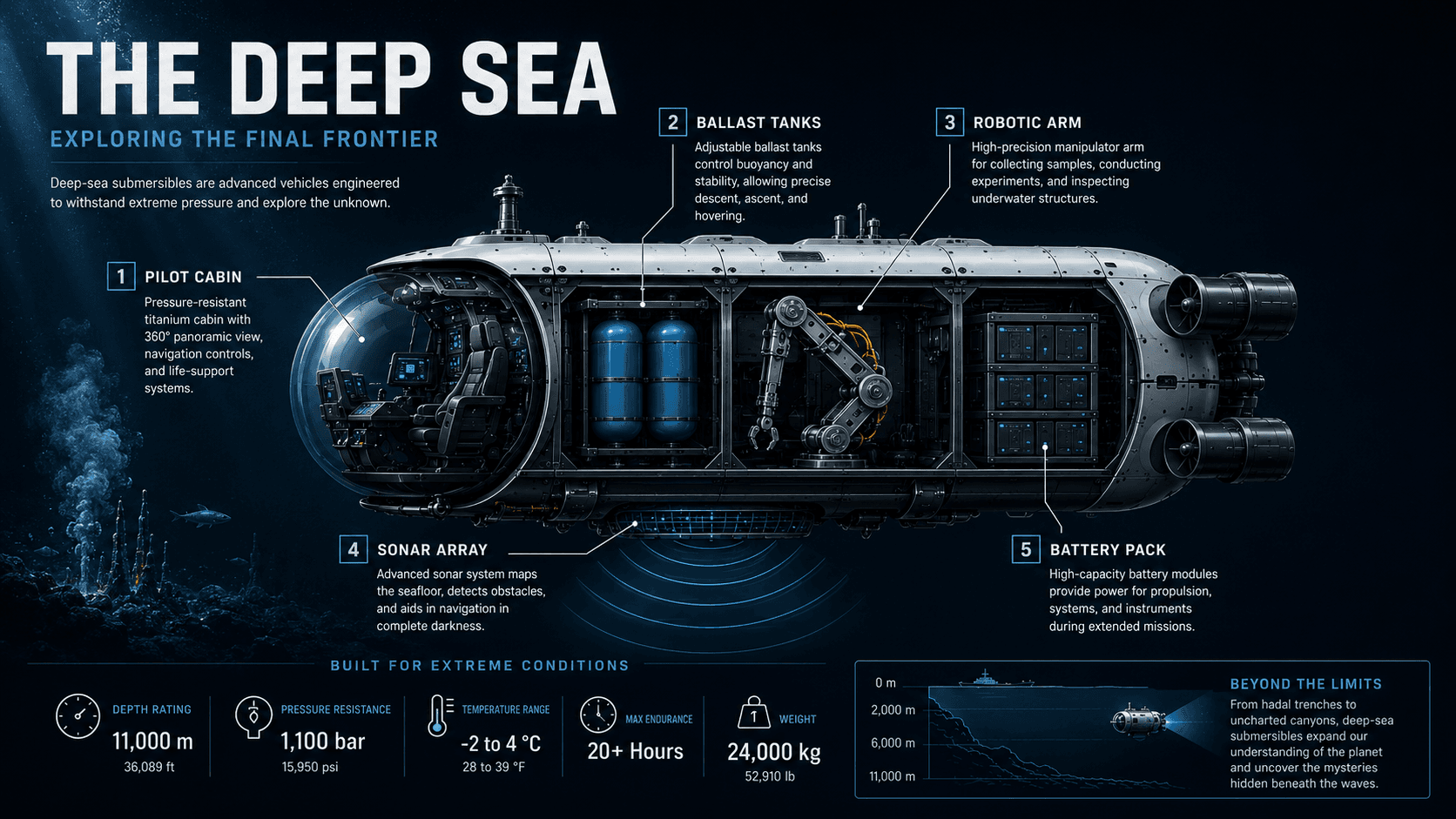
Seedream 5.0 Pro
Winner: Seedream 5.0 Pro — delivers more of the "high information density" the prompt explicitly asked for, without losing visual hierarchy.
Overall score:
Seedream 5.0 Pro 3, Grok Image 2.0 2. It's close, and the split lines up with what we'd expect from each model's design philosophy: Grok took the two tests that reward literal, restrained execution (steampunk lighting balance, subway typography), while Seedream took the three that reward richer elaboration and denser information (Provence, cyberpunk, infographic).
What this tells us:
across all five tests, neither model produced broken text or an obviously off-brief result — a solid baseline either way. The consistent pattern was that Grok Image 2.0 leaned toward tighter, more literal execution with cleaner, more restrained compositions, while Seedream 5.0 Pro leaned toward denser, more elaborated scenes and, on the infographic test, genuinely additive content beyond the prompt. That tracks with each model's stated design philosophy — precise instruction-following versus deep prompt understanding — more than it suggests one model is simply "better" across the board.
One honest caveat: this is a single qualitative pass over one generation of each prompt, not a scored, repeated benchmark — outputs can vary between re-rolls, and your own prompts and taste may point you toward a different model than ours did. Treat this as a real data point, not the final word.
Real-World Pricing: What You'd Actually Pay
The wholesale API prices quoted in the specs table ($0.04/image for Grok Image 2.0, $0.045/image for Seedream 5.0 Pro via OpenRouter) are what a developer pays calling the raw model through an API aggregator — not what you'd pay using a finished consumer product. The actual cost differs by tier and by platform, so it's worth breaking down separately.
Grok Image 2.0 on GrokImage20.com is sold as one-time credit packs, and a standard-quality image typically costs 2 credits to generate. Current pack pricing looks like this:
| Pack | Price | Credits | Cost per credit | Best for |
|---|---|---|---|---|
| Basic | $9.90 | 200 credits | $0.050/credit | Quick experiments and casual use |
| Major (best value) | $29.90 | 650 credits | $0.046/credit | Regular creative work and image editing |
| Professional | $99.90 | 2,500 credits | $0.040/credit | High-volume image production |
At 2 credits per standard image, that works out to roughly $0.08–$0.10 per image depending on which pack you buy, with the Professional tier offering the lowest effective cost at higher volume. All three tiers include text-to-image generation, image editing, multiple aspect ratios, up to 4 images per request, no watermark, and secure Stripe checkout. Pricing and any active discounts are best confirmed on the pricing page directly, since promotional pricing can change.
Seedream 5.0 Pro, when accessed directly through ByteDance's own API rather than a third-party aggregator, is priced at $0.075 per image for outputs up to 2.36 megapixels — noticeably higher than the $0.045/image OpenRouter wholesale rate. Interestingly, that direct-API price lands close to Grok Image 2.0's real-world cost on GrokImage20.com ($0.08–$0.10/image via credit packs), even though Grok Image 2.0 looked meaningfully cheaper when only the OpenRouter wholesale numbers were compared. Platform-specific credit systems add another layer on top of both — for example, the aggregator app Melies prices Seedream 5.0 Pro at 15 credits versus Grok Image 2.0's 10 credits for the same generation — so the exact number you pay ultimately depends on which door you walk through.
Put side by side, once you move past the raw wholesale API rate, Grok Image 2.0 and Seedream 5.0 Pro land closer together in real-world cost than the headline "$0.04 vs $0.045" figure suggests — the bigger practical trade-off ends up being resolution and reference-image count, not a flat per-image discount.
A Practical Workflow Example
To see how the two models' strengths play out in practice, consider a common task: producing a studio product shot with on-image text for an ecommerce listing.
With Grok Image 2.0, the workflow on GrokImage20.com follows a short loop: choose a starting point (text prompt or an uploaded reference image), write a creative brief that names the subject, environment, composition, style, lighting, and any required text, set the aspect ratio to match the destination (3:4 for a product listing, for example), then generate and review. If the lighting is right but the background needs to change, an editing pass can target just that element while keeping the product's geometry, branding, and color intact — which is where Grok Image 2.0's edit-preservation behavior matters most.
With Seedream 5.0 Pro, the same brief benefits from its higher reference-image ceiling if you're trying to match an existing product photography style across a whole catalog — you can feed in several reference shots at once rather than describing the style purely in words. Its 2K output and stronger multilingual text handling also make it a better fit if the same listing needs versions in multiple languages.
Neither workflow is objectively faster; the deciding factor is usually whether your task needs precise, budget-friendly single-image edits (Grok Image 2.0) or multi-reference consistency and multilingual layout (Seedream 5.0 Pro).
Strengths and weaknesses
Grok Image 2.0
Strengths
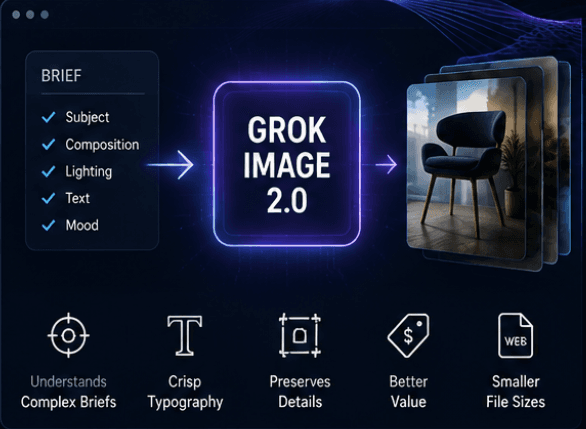
- Tighter instruction following on complex briefs — when an image needs to satisfy subject, composition, lighting, and text requirements at once, Grok Image 2.0 sticks to the brief rather than drifting toward "attractive but off-spec."
- Deliberate, controlled typography — crisp text rendering, well suited to product visuals and copy-heavy layouts.
- Stable detail preservation across edits — confirmed product details, identity, and composition tend to survive multiple editing passes.
- Better price-to-volume ratio — a lower per-image starting price at the API level, and on GrokImage20.com specifically, the credit-pack pricing above keeps the effective cost around $0.08–$0.10 per image even at entry-level volume.
- Smaller file sizes — WebP output makes it easier to drop straight into web and ecommerce use.
The trade-offs: resolution tops out at 1K, editing is limited to a single reference image, and multilingual text rendering isn't as systematic as Seedream 5.0 Pro's. If your project genuinely needs 2K output or text in ten-plus languages, those limits will matter more than the price advantage.
Seedream 5.0 Pro
Strengths
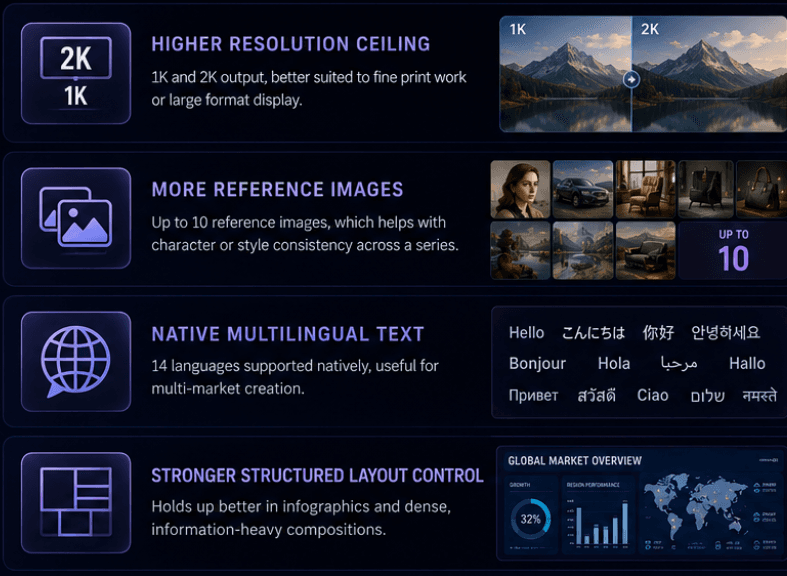
- Higher resolution ceiling — 1K and 2K output, better suited to fine print work or large-format display.
- More reference images — up to 10, which helps with character or style consistency across a series.
- Native multilingual text — 14 languages supported natively, useful for multi-market creative.
- Stronger structured layout control — holds up better in infographics and dense, information-heavy compositions.
The trade-offs: higher per-image cost, and no WebP output. For teams that don't need the extra resolution or reference-image headroom, that premium may not translate into a noticeably better result for everyday work.
Which one to pick
- Budget-conscious, high-frequency output — go with Grok Image 2.0. The same budget stretches further, and instruction following plus typography control cover most product shots, posters, and social creative needs.
- Chasing maximum quality, final deliverables — go with Seedream 5.0 Pro. 2K resolution and finer structured control suit portfolio pieces or client-facing final assets.
- Need character or style consistency across many images — Seedream 5.0 Pro's 10-reference-image ceiling is the better fit for that workflow.
- Need to hit a strict brief and preserve details across multiple edit passes — Grok Image 2.0's editing loop suits a short generate–review–refine cycle. That's also why GrokImage20.com combines text-to-image and image editing in one workspace: write the brief, generate, then keep editing while protecting what needs to stay.
- Testing ideas before committing budget — start with Grok Image 2.0's lower per-image cost to iterate quickly, then move a shortlisted concept to Seedream 5.0 Pro if you need the extra resolution for a final deliverable.
FAQ
Can I use both models for the same project? Yes — many teams use Grok Image 2.0 for fast, budget-friendly iteration and switch to Seedream 5.0 Pro for the final high-resolution or multilingual deliverable. There's no technical reason to lock into one model for an entire project.
Which model is faster to generate with? Both are rated at medium generation speed, so neither has a clear speed advantage — plan your workflow around feature needs and cost rather than latency.
Do the prices in this article match every platform? No. API wholesale pricing (via OpenRouter), platform-specific credit systems (like Melies), and GrokImage20.com's own credit packs are three different pricing models with different markups and included features. Always check the specific product's pricing page before budgeting for a project.
How do I compare actual output quality myself? Use Sousaku AI's side-by-side gallery for existing examples, or run your own 2–3 prompt test on Grok Image 2.0 and Seedream 5.0 Pro using the prompt categories described above.
Bottom line
Grok Image 2.0 and Seedream 5.0 Pro aren't a simple "which is better" comparison — they reflect two different product philosophies. One prioritizes budget and instruction precision; the other prioritizes resolution ceiling and structured control. If your workflow is high-frequency product or marketing visuals that need precise copy and stable editing, try Grok Image 2.0 on GrokImage20.com. If you're producing multilingual, high-resolution final deliverables, Seedream 5.0 Pro is likely the better call. For many teams, using both — rather than betting on a single model — ends up being the more practical approach.