Beverage advertising prompt with planned ecommerce copy space
Ecommerce and beverage advertising prompt example with planned copy space. This page documents the exact prompt attached to the existing site-generated asset, then explains the visual decisions a reviewer can verify.
Published August 31, 2026 · Updated August 31, 2026 · Created and reviewed by GrokImage20.com from the recorded prompt and visible asset.
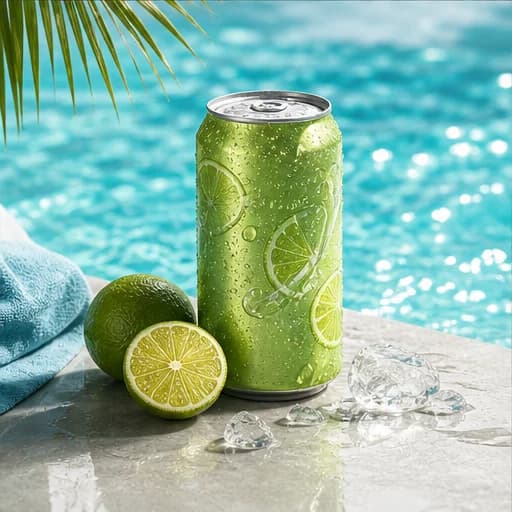
One chilled lime can on the left third, cold droplets, poolside setting, crisp sunlight, cyan and lime palette, clear space for copy, 16:9.
The recorded prompt requests a 16:9 campaign composition; the examples grid displays a square presentation crop.Open this promptThe brief in verifiable parts
- Intended use
- Wide beverage campaign hero
- Subject
- One chilled lime can
- Mode
- Text to image
- Composition
- Product on the left third
- Prompt framing
- 16:9
- Gallery crop
- 1:1 square
- Main review risk
- Packaging, condensation, and copy-space accuracy
Method: this case connects one recorded prompt with the visible site asset. It is a creative analysis, not a controlled benchmark or a promise that another generation will reproduce the same pixels. Prompt-directed framing is reported separately from the square gallery crop, and unknown provider settings are not inferred.
Why this advertising prompt is specific
The prompt begins with one chilled lime can, reducing ambiguity about the hero object and quantity. Left third is not decorative wording; it reserves the rest of the frame for campaign messaging. Cold droplets provide a visible freshness cue, while a poolside setting connects the product with summer use without requiring people or an elaborate story. Crisp sunlight defines the expected contrast and shadow character. Cyan and lime establish a tight color system that connects water, sky, citrus, and packaging. Clear space for copy turns the image into a layout rather than a standalone illustration. The 16:9 instruction identifies a wide advertising destination, although the gallery uses a square crop for consistent browsing.
Building useful negative space
Negative space works only when the prompt also controls subject position. Asking for clear space without saying where the product belongs can produce an empty strip in the wrong place. Here the can sits on the left third, so the right side can carry a headline, price, or button. For a right-aligned website panel, reverse those instructions. Describe the background in broad layers rather than filling it with objects: pool edge, sunlit water, distant soft context. After generation, test real copy over the image because apparently empty water may still be too bright or visually noisy. A subtle gradient overlay in the final design can improve accessibility, but it should not be used to hide a fundamentally unsuitable composition.
Color, condensation, and believable surfaces
Cyan and lime create a high-energy palette, but color direction does not guarantee a brand-accurate result. Treat the output as concept imagery unless you are editing a verified product reference. Condensation should follow gravity, vary in droplet size, and sit on the can rather than float around it. The can needs a believable contact shadow and should not melt into the pool edge. Crisp sunlight implies sharper shadows and brighter highlights than a soft studio scene, yet label details still need to remain readable. If a real SKU is involved, use an approved packshot as a reference image and preserve its proportions. Never rely on generated text, nutrition details, trademarks, or packaging claims without manual replacement and review.
Variations for ecommerce placements
For a marketplace thumbnail, remove the pool narrative and ask for a clean background with centered product scale. For a storefront hero, retain the wide framing and copy space. For a social story, change the requested aspect ratio to a tall format and move the can lower so interface overlays do not cover it. A multipack image should be prompted as a deliberate arrangement rather than generated by asking for more cans, because repeated objects can create inconsistent labels and geometry. Background replacement is often the safer workflow: begin with a controlled product source, mask or preserve the can, and generate only the poolside environment. That approach separates product truth from creative atmosphere and makes approval easier.
Quality and compliance review
Review the image at full resolution and at the final delivery size. Check the rim, pull tab, cylinder shape, reflections, waterline, droplets, and shadow direction. Remove accidental lettering, counterfeit branding, or unreadable pseudo-type. Verify that the product occupies the planned safe area at desktop and mobile breakpoints. If promotional text will be added, measure contrast and keep essential words in live HTML when the asset appears on a webpage. Record the prompt, reference asset, crop, and final edits so the campaign can be reproduced. This page documents a visual prompt example; it does not claim that generated packaging is legally approved, factually accurate, or ready for sale without human review.
Likely failure modes and the next useful iteration
This concept can fail when the can drifts toward the center and eliminates the copy area, or when bright water creates low contrast behind a future headline. Another common problem is condensation that looks painted on rather than attached to the metal. Review the left-third placement first, then test real campaign copy over the right side. If the layout is wrong, preserve the sunlight and palette while restating subject position and empty-space requirements. If packaging geometry is wrong, switch to an approved reference-image workflow rather than repeatedly asking text generation to recreate the same can. The next iteration should solve layout or product fidelity, not both at once.
Continue with the right workflow
Use the AI image prompt guide to build another brief from subject, environment, composition, light, and constraints. The complete generation workflow explains aspect ratios and review passes. When a real product or existing visual must remain recognizable, follow the reference-image editing guide and state both the requested change and the details that must stay consistent.
Adapt the decisions, not just the nouns.
Open the generator with this recorded prompt, then change its subject, layout, and constraints for your project.